From document understanding to task-driven and autonomous agents – we tailor AI solutions to your goals, delivering success without compromising on ethics or security.
Despite adopting AI for research and personal productivity, many companies still struggle to scale AI benefits to automate processes and tasks that involve multiple systems and teams.
We use proven AI technologies to deliver secure, scalable, and data-driven AI solutions that make a measurable impact.
Trusted by
How we deliver
Intelligent document processing
We use Azure AI Document Intelligence and other technologies to read and extract information from documents such as invoices, orders, delivery dockets, lab results, patient records, referral emails, and more. We can extract and summarise content, classify documents, and seamlessly transfer data to the systems that need it while keeping humans in the loop.
We help customers adopt AI beyond personal productivity and automate tasks and processes at scale. We use Power Automate for predictable, routine tasks, and design and deploy agents for more variable tasks that require conversational input or output, as well as knowledge retrieval and interpretation.
For more complex automation requirements, multiple agents and flows can work together – the agent decides, and Power Automate executes. You may have agents from various systems communicating through an MCP interface, connecting their information and knowledge.
Related technologies:
Agents
Model Context Protocol (MCP)
Large Language Models (LLMs)
AI assisted summaries and communication
With Microsoft 365 Copilot, your team can quickly generate summaries, draft responses and prepare updates directly in tools like Outlook, Teams and Word. Everything runs with enterprise-grade security, so your information stays protected while your team works faster.
Related Technologies:
Generative AI
Large Language Models (LLMs)
How we deliver
Intelligent document processing
We use Azure AI Document Intelligence and other technologies to read and extract information from documents such as invoices, orders, delivery dockets, lab results, patient records, referral emails, and more. We can extract and summarise content, classify documents, and seamlessly transfer data to the systems that need it while keeping humans in the loop.
Related technologies:
Computer vision and OCR
Machine Learning
Anomaly & Fraud detection
Automated tasks and workflows
We help customers adopt AI beyond personal productivity and automate tasks and processes at scale. We use Power Automate for predictable, routine tasks, and design and deploy agents for more variable tasks that require conversational input or output, as well as knowledge retrieval and interpretation.
For more complex automation requirements, multiple agents and flows can work together – the agent decides, and Power Automate executes. You may have agents from various systems communicating through an MCP interface, connecting their information and knowledge.
Related technologies:
Agents
Model Context Protocol (MCP)
Large Language Models (LLMs)
AI assisted summaries and communication
With Microsoft 365 Copilot, your team can quickly generate summaries, draft responses and prepare updates directly in tools like Outlook, Teams and Word. Everything runs with enterprise-grade security, so your information stays protected while your team works faster.
Related Technologies:
Generative AI
Large Language Models (LLMs)
Real results from kiwi organisations
Government-owned food assurance agency
Solutions implemented
Azure AI Document Intelligence to read and extract data from lab results
Power Automate to route documents and automate approvals
SharePoint to store records in a single, searchable location
Key results achieved
Manual data entry reduced significantly
Documents are easier to find and manage
Lower risk of lost or mis‑filed information
Faster processing of lab results
New Zealand veterinary network
Solutions implemented
Power Automate to match proofs of delivery automatically
AI‑based document reading to extract key information
Key results achieved
Two to three hours of manual work removed each day
Improved accuracy in delivery matching
Faster processing with fewer errors
What this means for your team
Faster processes with fewer mistakes
Automation shortens cycle times and reduces human error, helping your team complete work more quickly and accurately.
Clear oversight and stronger control
Every action is recorded, giving you full audit trails and policy‑driven governance. This brings confidence, visibility and consistency across your processes.
More time for meaningful work
By removing repetitive tasks, your team can focus on higher‑value activities such as forecasting, analysis and supporting customers – not paperwork.
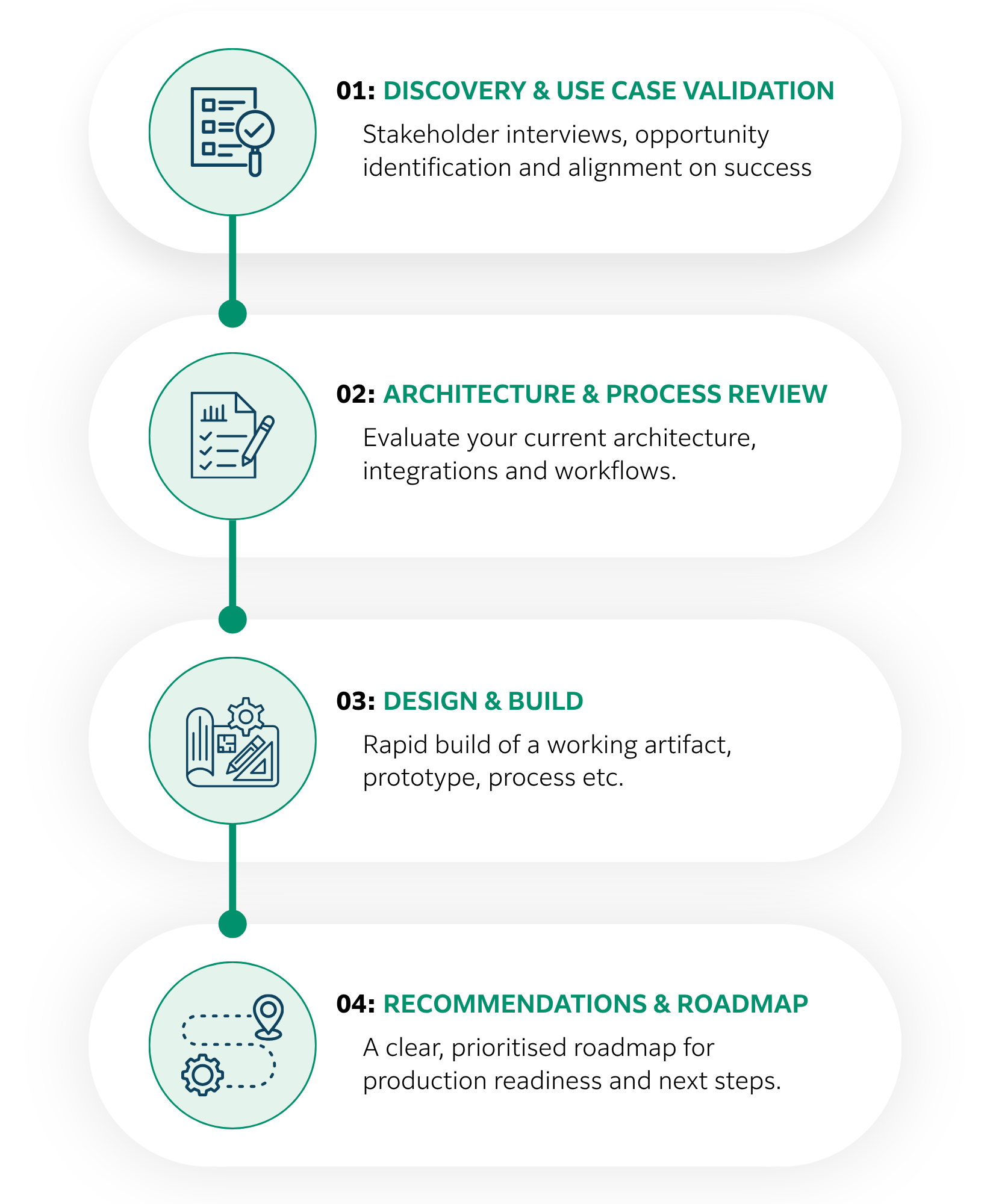
Our engagement model
A structured approach that guides you from planning to adoption.
Our engagement model
A structured approach that guides you from planning to adoption.
Contact us now
Book a free 30 minute discovery session with one of our AI and Automation experts.
Why partner with FUJIFILM Process Automation
Proven delivery across New Zealand
We have a strong track record supporting finance, operations and customer experience teams. Our work brings together Microsoft Power Platform and Dynamics, along with finance automation tools such as Esker when they are the right fit.
Focused on outcomes, not just technology
We start with discovery and clear goals. Governance, change support and adoption are built into every project so your organisation sees real, lasting benefits.
Built on the Microsoft ecosystem
Our solutions follow Microsoft best practice and use Fabric, Power Platform, Dynamics 365 and Azure AI. This gives you secure, scalable and high value architectures that grow with your business.
Microsoft certified expertise
We are proud to be among a select group of New Zealand partners recognised across all six Microsoft Cloud Solutions Partner areas.
Automation is designed to reduce repetitive, manual work – not replace people. Teams typically gain capacity to focus on higher‑value tasks such as analysis, forecasting, customer support and quality improvement.
How accurate is AI based document extraction?
Accuracy is high for semi-structured documents (e.g., invoices, statements, proofs of delivery) and improves further with custom models. We fine-tune extraction to your document types, validate the results, and build exception‑handling workflows to safeguard accuracy.
How do we ensure automation doesn’t break as processes evolve?
We create robust and modular processes that can adapt to the evolving needs of your business. Given that AI technology is advancing more rapidly than any previous technology, we also develop a customised roadmap that includes monitoring, support, and maintenance services. This approach ensures long-term, sustainable results.
What are cloud flows and desktop flows?
Cloud flows run online and automate tasks across modern systems. They can send approvals, move data between applications and update records in tools like Microsoft 365, Dynamics 365 and SharePoint. Because they run in the cloud, they connect easily to hundreds of services without needing any manual steps.
Desktop flows automate older or on‑premise systems that cannot connect through APIs. They work by recording actions such as clicks and typing, then repeating them automatically. This is useful when you still rely on legacy software, desktop applications or manual data entry.
Used together, cloud flows handle the modern digital parts of a process, while desktop flows take care of any steps that still depend on older systems. This means you can automate an entire workflow from start to finish, even if your technology stack is mixed.
What is MCP?
MCP stands for Model Context Protocol, and it is a standard way for agents to discover, understand, and safely use tools, data sources, and actions at runtime. For example, you could communicate with an external system’s agent via an in-built Teams agent to approve an invoice or acknowledge a good receipt.
What is the difference between an Agent and Power Automate?
Power Automate is used for predictable, routine tasks, while agents handle more variable tasks that require conversational input or output, as well as knowledge retrieval and interpretation.
For more complex automation requirements, multiple agents and flows can work together – the agent decides, and Power Automate executes.
This website uses cookies to analyse our traffic and to ensure you get the best experience. By clicking “Accept”, you agree to our Terms of Use and Cookie Policy.